01
Overview
01
Overview
Creating a voice authenticator application
Creating a voice authenticator application
Designing a Voice Authentication Experience That Increased Client Conversions by 2.5×
Designing a Voice Authentication Experience That Increased Client Conversions by 2.5×
Designing an interactive product experience that lets users experience the power of Gnani.ai's voice recognition technology.
Designing an interactive product experience that lets users experience the power of Gnani.ai's voice recognition technology.
Role
UI/UX Designer
Role
UI/UX Designer
Timeline
4 months
Timeline
4 months
Platform
Mobile App
Platform
Mobile App
Key Outcome
2.5X Client Conversion
Key Outcome
2.5X Client Conversion

My Role
My Role
UX/UI Designer · Gnani.ai
UX/UI Designer · Gnani.ai
At Gnani.ai, I worked across multiple product initiatives, including Voice Biometrics and Bot Builder. My role combined UX, interaction design, visual design, and prototyping to turn complex voice and conversational AI capabilities into experiences that users could understand and explore.
At Gnani.ai, I worked across multiple product initiatives, including Voice Biometrics and Bot Builder. My role combined UX, interaction design, visual design, and prototyping to turn complex voice and conversational AI capabilities into experiences that users could understand and explore.
What I owned
What I owned
UX & User Flows — Defined the core flows for voice enrollment, authentication, voice management, and chatbot creation.
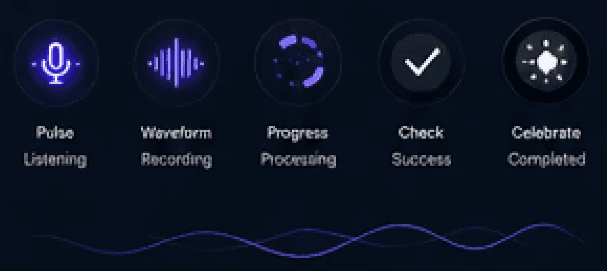
Interaction Design — Designed the different states of voice interaction, from listening and recording to processing, success, and failure.
UI Design — Created the visual language and interface for the mobile experience, including dashboards, voice management, and authentication screens.
AI Experience Design — Simplified complex voice and chatbot capabilities into approachable, step-by-step experiences.
Prototyping — Built interactive prototypes to communicate and validate product interactions.
Visual Design — Developed interface components, visual assets, and interaction patterns aligned with Gnani.ai's product and brand.
Cross-functional Collaboration — Worked with stakeholders and developers to take concepts from early exploration through implementation.
UX & User Flows — Defined the core flows for voice enrollment, authentication, voice management, and chatbot creation.
Interaction Design — Designed the different states of voice interaction, from listening and recording to processing, success, and failure.
UI Design — Created the visual language and interface for the mobile experience, including dashboards, voice management, and authentication screens.
AI Experience Design — Simplified complex voice and chatbot capabilities into approachable, step-by-step experiences.
Prototyping — Built interactive prototypes to communicate and validate product interactions.
Visual Design — Developed interface components, visual assets, and interaction patterns aligned with Gnani.ai's product and brand.
Cross-functional Collaboration — Worked with stakeholders and developers to take concepts from early exploration through implementation.
My focus
My focus
Make sophisticated voice technology feel simple, understandable, and trustworthy.
Make sophisticated voice technology feel simple, understandable, and trustworthy.
02
The Problem
02
The Problem
We experienced low sign up rates for the product despite having the technology
We experienced low sign up rates for the product despite having the technology
Gnani.ai was building conversational AI and voice technologies. Voice Biometrics was created as an interactive environment where users could experience the voice recognition engine firsthand.
Gnani.ai was building conversational AI and voice technologies. Voice Biometrics was created as an interactive environment where users could experience the voice recognition engine firsthand.
01
Add / register their voice
Add / register their voice
02
Authenticate using their voice
Authenticate using their voice
03
Remove their voice
Remove their voice
04
Create their own voice-enabled chatbot
Create their own voice-enabled chatbot
03
The Challenge
03
The Challenge
How do you make complex voice technology feel simple?
How do you make complex voice technology feel simple?
The underlying technology is complicated. The users shouldn't have to understand models, authentication logic or infrastructure. They should simply speak and see the technology respond.
The underlying technology is complicated. The users shouldn't have to understand models, authentication logic or infrastructure. They should simply speak and see the technology respond.

Understandable
Understandable
Users immediately understand what
they can do.
Consistent contributions with automatic tracking.

Interactive
Interactive
The product demonstrates the technology,
not just explains it.
Shared progress keeps everyone committed to the goal.

Trustworthy
Trustworthy
Voice authentication demands clarity,
transparency and control.
AI calculates contributions and timelines.

Engaging
Engaging
Users should want to explore and
build beyond a demo.
Save in-app or connect your preferred account.
04
Product Goal
04
Product Goal
Three things the experience needed to accomplish.
Three things the experience needed to accomplish.
01
Demonstrate
Demonstrate
Let users experience the accuracy and capabilities of the voice recognition engine.
Consistent contributions with automatic tracking.
02
Simplify
Simplify
Turn technically complex voice processes into single, intuitive interactions.
Shared progress keeps everyone committed to the goal.
03
Extend
Extend
Go beyond a voice demo by allowing users to create their own voice-enabled chatbots.
Shared progress keeps everyone committed to the goal.
05
Core User Flow
05
Core User Flow
One voice. Three fundamental actions.
One voice. Three fundamental actions.

Add
Users register their voice.
Consistent contributions with automatic tracking.
Authenticate
Users speak a phrase and the system verifies their identity.
Shared progress keeps everyone committed to the goal.
Manage
Users can view and remove registered voice.
Shared progress keeps everyone committed to the goal.
06
Designing For Trust
06
Designing For Trust
Authentication shouldn't feel like a black box.
Authentication shouldn't feel like a black box.
We made the invisible process visible at every step.
We made the invisible process visible at every step.
Input
User's voice is captured securely.
Consistent contributions with automatic tracking.
Processing
The engine analyses user's voiceprints.
Shared progress keeps everyone committed to the goal.
Result
User's get immediate feedback that their voice is registered.
Shared progress keeps everyone committed to the goal.

07
Chatbot Builder
07
Chatbot Builder
Create your own voice-enabled assistant.
Create your own voice-enabled assistant.


08
Design System
08
Design System
A visual language inspired by voice.
A visual language inspired by voice.

09
Interaction & Motion
09
Interaction & Motion
Motion that communicated system sate.
Motion that communicated system sate.
10
Outcomes
10
Outcomes
Deliver a remarkable voice experience.
Deliver a remarkable voice experience.


Let's connect
I turn complex products into clear, scalableexperiences.
Let's connect
Looking for a designer who thinks
beyond the interface?
Looking for a designer who thinks
beyond the interface?
I enjoy partnering with ambitious teams to transform complex problems into intuitive products
that users love and businesses can grow around. Whether you're building from zero or improving
an existing experience, I'd love to hear what you're working on.
I enjoy partnering with ambitious teams to transform complex problems into intuitive products that users love and businesses can grow around. Whether you're building from zero or improving an existing experience, I'd love to hear what you're working on.